> ## Documentation Index
> Fetch the complete documentation index at: https://rive-transitions-2.mintlify.site/llms.txt
> Use this file to discover all available pages before exploring further.
# HTML Embed
> Embed Rive in platforms that support custom HTML.
Use Rive in any platform that supports custom HTML embeds by pasting the **Embed Code** or **Embed Link** generated from the Rive editor.
This is useful for tools like **WordPress** and other platforms where you can add your own HTML, but a [dedicated Rive integration](/integrations/overview) or [runtime](/runtimes) is not available.
## Generate the embed code
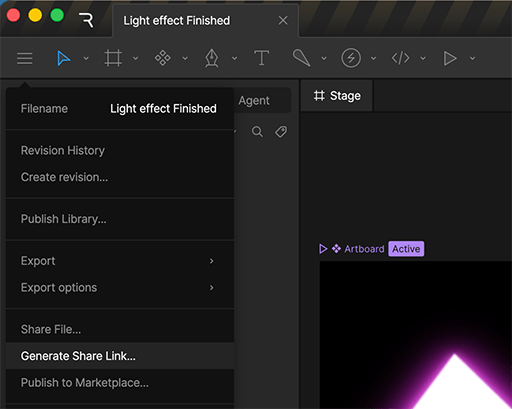
In the Rive editor, click the **hamburger menu** in the top-left corner and select **Generate Embed URL**.
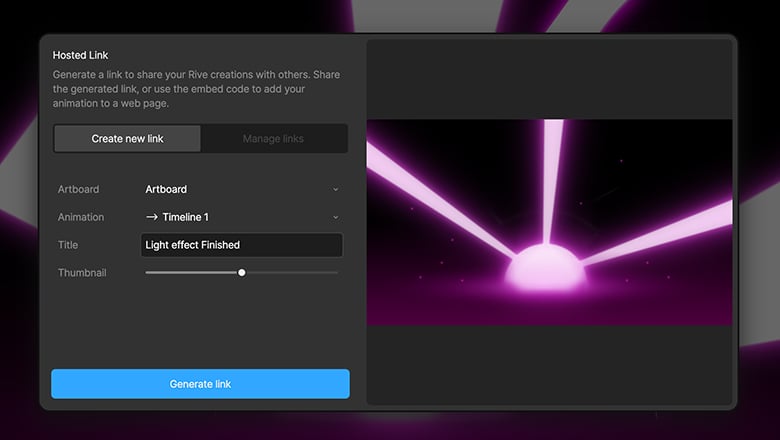
 In the dialog that appears, click **Generate Embed URL**.
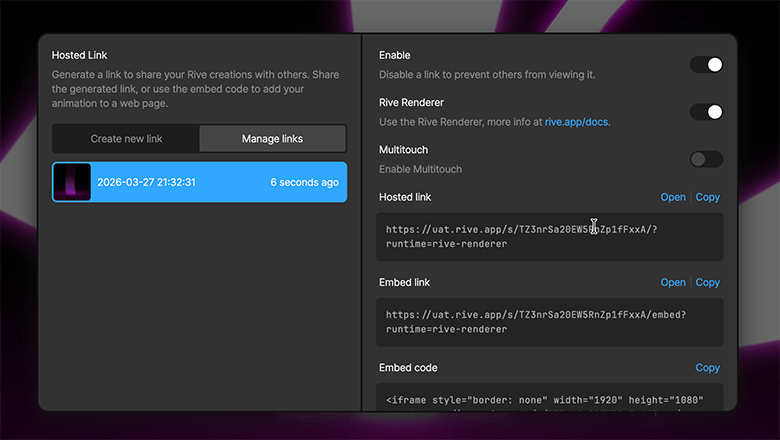
 Once the URL is generated, select the option that best fits how you plan to use your file.
Some platforms (like Notion) support embedding directly from an **Embed link**. Otherwise, use the iframe **Embed code**.
For more information about the various types of embed URLs, see [Embed URLs](/editor/embed-urls/overview#embed-url-options).
Once the URL is generated, select the option that best fits how you plan to use your file.
Some platforms (like Notion) support embedding directly from an **Embed link**. Otherwise, use the iframe **Embed code**.
For more information about the various types of embed URLs, see [Embed URLs](/editor/embed-urls/overview#embed-url-options).
 ## Add the embed to your platform
## Need help?
Support for embeds depends on the platform you are using. For issues with adding custom HTML or iframes, refer to that platform’s documentation or support channels.
## Add the embed to your platform
## Need help?
Support for embeds depends on the platform you are using. For issues with adding custom HTML or iframes, refer to that platform’s documentation or support channels.